
PayPal FAQs
How can I tell if our account is approved for PayPal Payouts?
Unfortunately, it can be difficult to tell if your account is approved or not. The two most direct ways are to:
- Follow the steps in Connect PayPal to Roster and check to see if there is a warning banner upon connecting your account.
- Check for the green arrow in the Live column of the Payouts row in the Permissions table on your PayPal developer account status page.
See Troubleshoot PayPal Issues for additional help.
How do I contact PayPal to get approved for Payouts?
If it has been 3 or more days since you submitted your Payouts request within your PayPal account, call PayPal directly at 1-888-221-1161.
Is connecting PayPal within Roster secure?
We take security extremely seriously at Roster and go through regular security audits from outside security testing companies. That said, we recommend creating a strong payment password when setting up your PayPal integration in Roster. This password encrypts your PayPal app's credentials in a way that makes it impossible for a bad actor or unintended user to send payments without knowing the password. We also recommend storing this password in a password manager and limiting the number of people on your team who have access to make payments within Roster.
Is PayPal the only way to send payments in Roster?
Nope, technically you can send payments any way you'd like. While Roster currently supports sending PayPal and Venmo payments directly within Roster, you can use our manual payments feature, export a CSV of the manual payments, and then import them into any payment platform of your choosing. Lots of Roster brands use the approach and fulfill payments via their own accounting system, Stripe, Payoneer, Shopify gift cards, Tango gift cards, and more.
See Send payments manually for details on sending payments manually.
Does Roster charge a fee to send via PayPal or Venmo
No, Roster does not charge any fees for using the PayPal integration when sending PayPal and/or Venmo payments. See the next question regarding PayPal's fees.
What are the fees for sending PayPal or Venmo payments?
PayPal charges per-payment fees. When sending payments through the PayPal integration in Roster, PayPal charges rates based on their Payouts API fee schedule, which can be found on the PayPal Merchant Fees page. Here is a quick summary from that page:
Do I have to integrate Venmo in order to send Venmo payments?
No, it is not necessary (or even possible) to integration Venmo separately from PayPal. PayPal owns Venmo and has added support for sending payouts to U.S. Venmo accounts.
To receive payments via Venmo, U.S. ambassadors must enter the mobile number connected to their Venmo account as their preferred payment method.
Why do we have to transfer the funds into our PayPal account first?
Unlike when sending a regular PayPal payment to an individual or when making a purchase from a merchant, which supports auto-transferring from your connected bank account or payment card, PayPal requires the full payment balance + fees to already be in your PayPal account before initiating the payment. Your payment will fail if your PayPal account doesn't have a sufficient balance.
What is our payment password when making a PayPal payment?
Your payment password is the password you set when connecting your PayPal account in Roster. (See Connect PayPal to Roster for details.) This is not the same as the password you use to log into your PayPal account.
If you or your teammates do not remember your payment password, simply disconnect the PayPal integration in Roster and re-connect it. You will be prompted to set a payment password during this process.
How do we reset our payment password?
For security purposes, it is not possible to reset your Roster account's payment password. See the previous question for steps on disconnecting and re-connecting your PayPal integration.
What if an ambassador hasn't entered their PayPal or Venmo info?
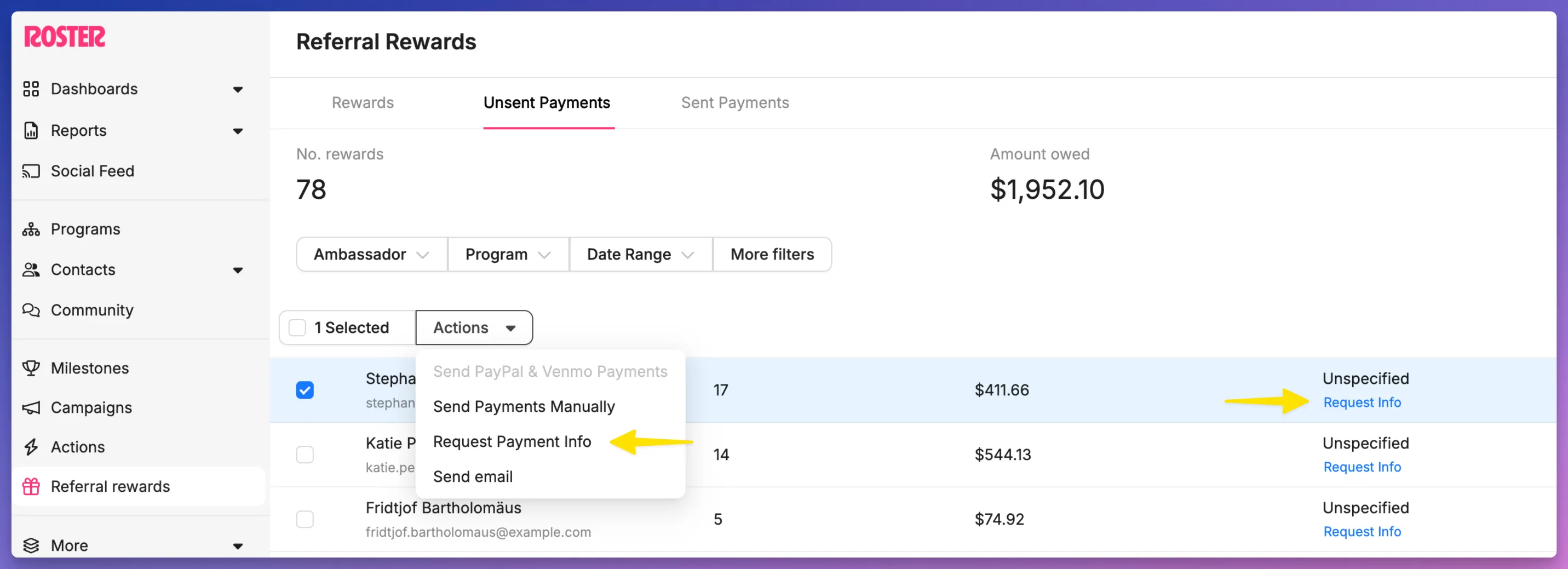
When attempting to send payments via the PayPal & Venmo integration, if one or more payees haven't provided their preferred payment method, then you will be unable to include them in the payment batch.
You can request payment info from an individual payee or from multiple payees while on the Unsent Payments page.
Can I add ambassadors PayPal or Venmo info directly?
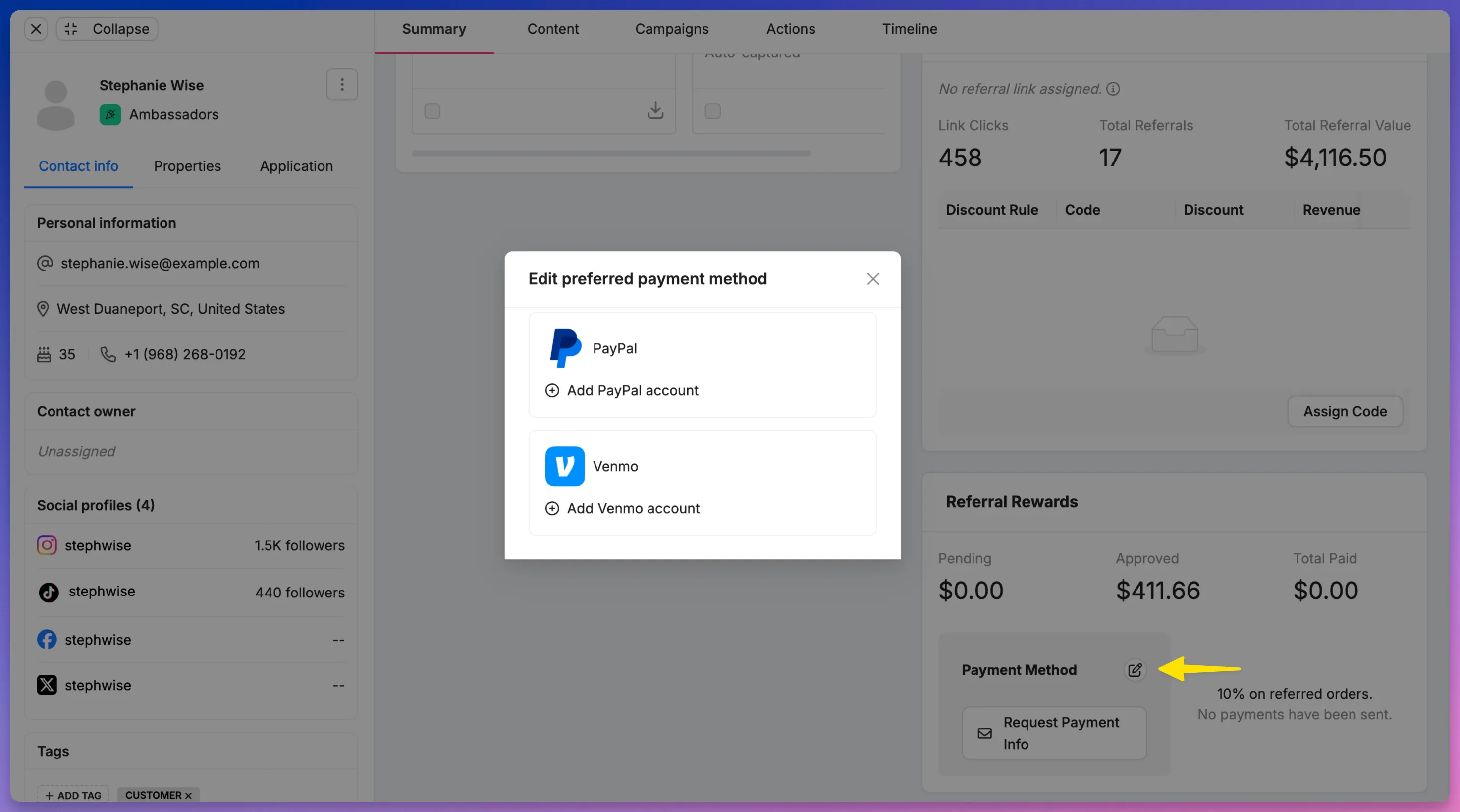
Yes, you can directly add an ambassador's PayPal or Venmo info directly on their profile. Simply open their contact details page, click on the edit payment method icon, and enter their PayPal or Venmo address.
Can we import ambassadors PayPal or Venmo from our prior platform?
Yes, you can import payment information for ambassadors in your Roster account. Reach out to [email protected] and we can work with your team to get their payment information added.
Why can't non-U.S. ambassadors receive Venmo payments?
Unfortunately this is a limitation imposed by PayPal. The only way to send Venmo payments through PayPal's payouts API is to U.S. payees using the 10-digit phone numbers associated with the Venmo accounts.
Need help?
If you have any questions or need assistance, please reach out to our customer success team at [email protected].